Gradle Multi-Project Builds
Multi-Project Builds
We developers and architects blindly follow trends just as often as those poor souls who can’t build software. Micro-servicing all of the things is a good example. Its fervor is dying down now, as we learn the pain-points associated with supporting thousands of tiny, separate components.
You can be cynical about these trends, but they can be helpful. When this one reached its height in popularity, many talked (as folks do about the latest trend) like this was the final solution to our problems. With our shiny new hammer in hand, we saw everything as a nail. Now that reality is setting in, we will likely add it to our toolbox, and learn to reach for it when it’s the right tool for the job.
This next year, I will be building several apps which will likely each consist of a fat jar on the front end, one to many micro-services on the back, plus some non-executable jars for core business logic and domain models. Since most of these components will be in the same functional boundary, I am wondering if I should buck the trend to build every jar separately, and instead, put them together in a multi-project build.
I’d really like the ability to build all of my components at once, or build them separately; whichever makes the most sense at the time. I’d like to be able to tie the whole thing to one Jenkins build, or have separate pipelines for each component. Basically, I want some flexibility; some middle ground between a monolith and a micro-service.
Gradle Multi-Project with JUST Eclipse Spring Boot Starter
I did some googling for examples that fit my wants: a Gradle multi-project that can be spun up in Eclipse using the Spring Boot Starter. Turns out there’s a lot of confusion out there. Seems everyone either uses IntelliJ, or Maven, or they scaffold with a command line and text editor. I saw dozens of posts that stated Eclipse simply won’t handle it. After a few nights of playing around, I think I have a working template. Surely, it’s not the answer, but it’s a place to start.
The Learning Process
Get up to speed
Since most of my Gradle builds have been pretty vanilla, I worked through the
Gradle Guide for Creating Multi-Project Builds in Atom.
That was easy!
Let er rip
I tried several different ways to repeat those steps in Eclipse, but I kept
running into issues. After I’d had it with blind trial-and-error, I decided I
was actually going to have to learn some stuff.
Back to School
These two Gradle Docs helped me better understand dependencies and decoupling
in a multi-build.
Scaffold your project
Once I kind of understood what to do, I made some notes on the steps I took. Here they are…
The Goal: This is what our project will look like once we’ve finished the scaffolding.
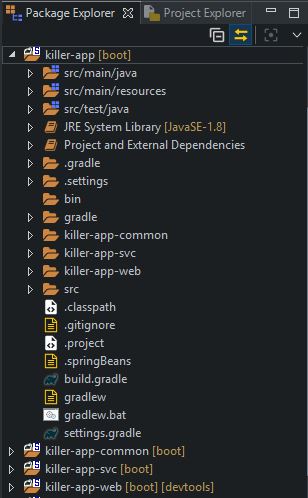
Create a Parent Project
- Eclipse: File -> New -> Spring Starter Project
-
Fill in the first window in the wizard; the name, artifact, etc.
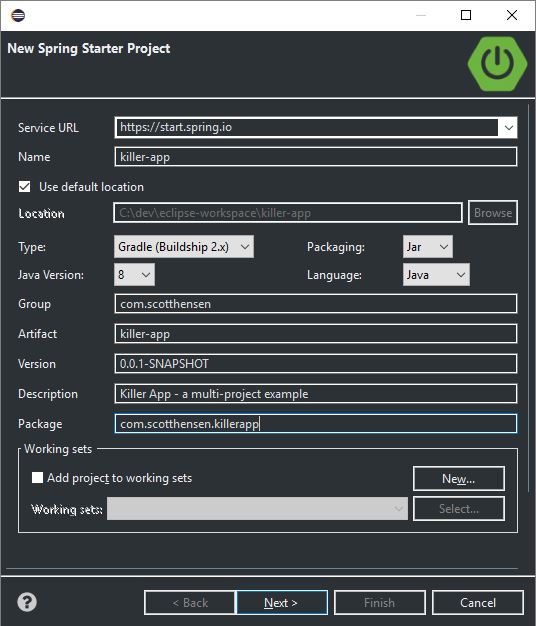
- Click Finish. (We don’t need to pick any dependencies for this one.)
Create a Web Sub-Project
- Highlight killer-app in Eclipse’s Project Explorer window.
- Right-click -> New -> Spring Starter Project
-
Give it a name, artifact, etc. on the first window of the wizard.
NOTE: Uncheck the ‘Use default location’ box, and set the location to be a child directory of the parent project.
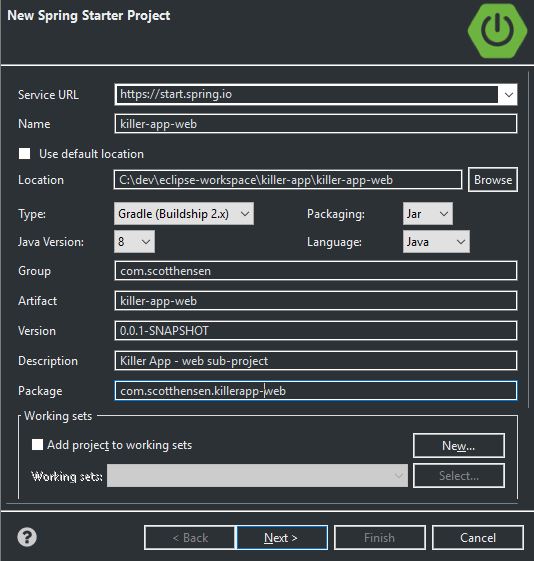
- Click Next. Pick Web, Actuator, Thymeleaf, DevTools, Lombok (whatever you like).
- Click Finish.
Create a Service Sub-Project
- Highlight killer-app in Eclipse’s Project Explorer window.
- Right-click -> New -> Spring Starter Project
-
Give it a name, artifact, etc.
Remember to set the location to be a child directory of the parent project.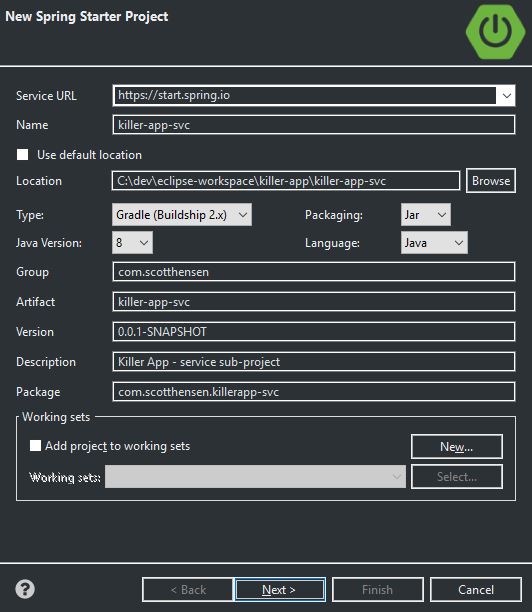
-
Click Next. Pick the stuff for your service. I only picked JPA, H2, MySQL and Lombok.
[IMHO, RESTful services are overkill for a basic web-app, so I’m going to treat this basic app accordingly. The advantage to keeping the front and back cleanly separated by sub-projects, though, is that, as soon as we find that our service needs to provide functionality to something other than our web app, we can quickly convert it to a REST service with just a few tweaks to the build and a few minor changes to the code.]
- Click Finish.
Create a Common Sub-Project
We will make one more sub-project to hold models shared between our sub-projects.
- Highlight killer-app in Eclipse’s Explorer window.
- Right click -> New -> Spring Starter Project
-
Give it a name, artifact, etc.
Remember to set the location to be a child of the parent directory.
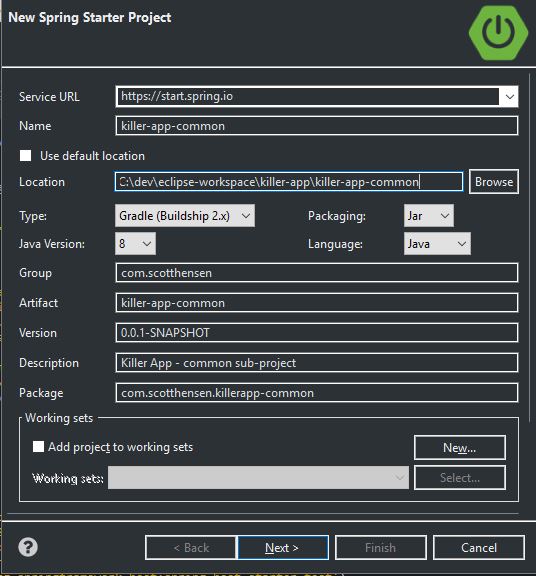
- Click Finish. (We’re just going to put POJOs in here.)
Housekeeping
We don’t want our parent project to contain any code, including the Spring Boot Application class, so delete these two files:
- killer-app/src/main/java/…/KillerAppApplication.java
- killer-app/src/test/java/…/KillerAppApplicationTests.java
Modify Gradle Settings files
- killer-app/settings.gradle: add include statements for your sub-projects.
rootProject.name = 'killer-app' include 'killer-app-common' include 'killer-app-svc' include 'killer-app-web' - killer-app-common/settings.gradle: comment out the rootProject
- killer-app-svc/settings.gradle: comment out the rootProject
-
killer-app-web/settings.gradle: comment out the rootProject
[We can probably delete these three settings files, but I kept them just in case I needed them as the project grew more complicated.]
Modify Gradle Build files
[NOTE: There are a lot of ways to skin this cat. Some folks like to put all shared build tasks and dependencies in the parent build’s allprojects and subprojects sections. I am choosing, for the sake of decoupling, to keep all of that stuff in the sub-project build files. My thinking is that this approach will make it easier to build them separately, or split them into different projects, with minimal effort. I did pull the mavenCentral() repository declaration up to the parent level, though, for demonstration purposes.]
killer-app/build.gradle
subprojects {
	repositories {
		mavenCentral()
	}
}

def javaProjects = subprojects.findAll {
	it.name in ['killer-app-common', 'killer-app-svc', 'killer-app-web']
}

// this INJECTS configuration into the other builds; it's needed for compiling from the parent project
configure(javaProjects) {
	apply plugin: 'java'
}

project(':killer-app-svc') {
	dependencies {
		compile project(':killer-app-common')
	}
}

project(':killer-app-web') {
	dependencies {
		compile project(':killer-app-common')
	}
}
killer-app-common/build.gradle (override the default bootJar step with a jar)
buildscript {
	ext {
		springBootVersion = '2.0.5.RELEASE'
	}
	repositories {
		mavenCentral()
	}
	dependencies {
		classpath("org.springframework.boot:spring-boot-gradle-plugin:${springBootVersion}")
	}
}

apply plugin: 'java'
apply plugin: 'eclipse'
apply plugin: 'org.springframework.boot'
apply plugin: 'io.spring.dependency-management'

group = 'com.scotthensen'
version = '0.0.1-SNAPSHOT'
sourceCompatibility = 1.8

dependencies {
	compile('org.springframework.boot:spring-boot-starter')
	testCompile('org.springframework.boot:spring-boot-starter-test')
}

// build a small, non-executable jar, instead of a fat jar
jar {
	enabled = true
}
killer-app-svc/build.gradle (override the default bootJar step with a jar)
buildscript {
	ext {
		springBootVersion = '2.0.5.RELEASE'
	}
	repositories {
		mavenCentral()
	}
	dependencies {
		classpath("org.springframework.boot:spring-boot-gradle-plugin:${springBootVersion}")
	}
}

apply plugin: 'java'
apply plugin: 'eclipse'
apply plugin: 'org.springframework.boot'
apply plugin: 'io.spring.dependency-management'

group = 'com.scotthensen'
version = '0.0.1-SNAPSHOT'
sourceCompatibility = 1.8

dependencies {
	compile('org.springframework.boot:spring-boot-starter-data-jpa')
	runtime('com.h2database:h2')
	runtime('mysql:mysql-connector-java')
	compileOnly('org.projectlombok:lombok')
	testCompile('org.springframework.boot:spring-boot-starter-test')
}

jar {
	enabled = true
}
killer-app-web/build.gradle (No changes needed)
buildscript {
	ext {
		springBootVersion = '2.0.5.RELEASE'
	}
	repositories {
		mavenCentral()
	}
	dependencies {
		classpath("org.springframework.boot:spring-boot-gradle-plugin:${springBootVersion}")
	}
}

apply plugin: 'java'
apply plugin: 'eclipse'
apply plugin: 'org.springframework.boot'
apply plugin: 'io.spring.dependency-management'

group = 'com.scotthensen'
version = '0.0.1-SNAPSHOT'
sourceCompatibility = 1.8

dependencies {
	compile('org.springframework.boot:spring-boot-starter-actuator')
	compile('org.springframework.boot:spring-boot-starter-thymeleaf')
	compile('org.springframework.boot:spring-boot-starter-web')
	runtime('org.springframework.boot:spring-boot-devtools')
	compileOnly('org.projectlombok:lombok')
	testCompile('org.springframework.boot:spring-boot-starter-test')
}
Build It
Build it the whole thing at once
C:\dev\eclipse-workspace\killer-app>gradlew build --dry-run
:killer-app-common:compileJava SKIPPED
:killer-app-common:processResources SKIPPED
:killer-app-common:classes SKIPPED
:killer-app-common:bootJar SKIPPED
:killer-app-common:jar SKIPPED
:killer-app-common:assemble SKIPPED
:killer-app-common:compileTestJava SKIPPED
:killer-app-common:processTestResources SKIPPED
:killer-app-common:testClasses SKIPPED
:killer-app-common:test SKIPPED
:killer-app-common:check SKIPPED
:killer-app-common:build SKIPPED
:killer-app-svc:compileJava SKIPPED
:killer-app-svc:processResources SKIPPED
:killer-app-svc:classes SKIPPED
:killer-app-svc:bootJar SKIPPED
:killer-app-svc:jar SKIPPED
:killer-app-svc:assemble SKIPPED
:killer-app-svc:compileTestJava SKIPPED
:killer-app-svc:processTestResources SKIPPED
:killer-app-svc:testClasses SKIPPED
:killer-app-svc:test SKIPPED
:killer-app-svc:check SKIPPED
:killer-app-svc:build SKIPPED
:killer-app-web:compileJava SKIPPED
:killer-app-web:processResources SKIPPED
:killer-app-web:classes SKIPPED
:killer-app-web:bootJar SKIPPED
:killer-app-web:jar SKIPPED
:killer-app-web:assemble SKIPPED
:killer-app-web:compileTestJava SKIPPED
:killer-app-web:processTestResources SKIPPED
:killer-app-web:testClasses SKIPPED
:killer-app-web:test SKIPPED
:killer-app-web:check SKIPPED
:killer-app-web:build SKIPPED

BUILD SUCCESSFUL in 2s
C:\dev\eclipse-workspace\killer-app>
Or, just build one sub-project (any dependencies get built first)
C:\dev\eclipse-workspace\killer-app>gradlew :killer-app-web:build --dry-run
:killer-app-common:compileJava SKIPPED
:killer-app-common:processResources SKIPPED
:killer-app-common:classes SKIPPED
:killer-app-common:jar SKIPPED
:killer-app-web:compileJava SKIPPED
:killer-app-web:processResources SKIPPED
:killer-app-web:classes SKIPPED
:killer-app-web:bootJar SKIPPED
:killer-app-web:jar SKIPPED
:killer-app-web:assemble SKIPPED
:killer-app-web:compileTestJava SKIPPED
:killer-app-web:processTestResources SKIPPED
:killer-app-web:testClasses SKIPPED
:killer-app-web:test SKIPPED
:killer-app-web:check SKIPPED
:killer-app-web:build SKIPPED

BUILD SUCCESSFUL in 2s
C:\dev\eclipse-workspace\killer-app>
Next Steps
I plan to convert one of my side-projects into a multi-project build. If I find any lessons learned, or realize that the return isn’t really worth the effort, I will post a follow-up.
Happy coding; hope you are making something cool.
My source code
https://github.com/ScottHensen/toolbox-gradle-multi-project
References
https://guides.gradle.org/creating-multi-project-builds
https://docs.gradle.org/current/userguide/multi_project_builds.html
https://docs.gradle.org/current/userguide/dependency_types.html